> For the complete documentation index, see [llms.txt](https://docs.goassay.ai/llms.txt). Markdown versions of documentation pages are available by appending `.md` to page URLs; this page is available as [Markdown](https://docs.goassay.ai/use-tools/zh/ru-men/add-funds.md).

# 充值

存入资金，批准付费调用后，本地 AI 应用即可使用这些资金。

只有能付款的应用才需要资金。如果你使用 claude.ai 或 ChatGPT 的托管连接器，完成[第一次免费调用](/use-tools/zh/ru-men/make-your-first-call.md)即可。这些连接器无法使用存入的资金。

使用本地应用时，你需要将美元代币存入 **Assay balance**（Assay 余额，即你的托管余额）。这笔余额由你的钱包控制，只有在你批准支付限额后，智能体才能使用。

{% hint style="info" %}
\*\*开始前：\*\*使用能付款的本地应用完成[连接你的 AI 应用](/use-tools/zh/ru-men/connect-your-ai-app.md)和[完成第一次免费调用](/use-tools/zh/ru-men/make-your-first-call.md)。你需要能操作 Assay 账户所用的钱包。
{% endhint %}

支付网络是 **Robinhood Chain**，使用 **USDG**。两笔钱包交易（授权额度和充值）都需要用 Robinhood Chain 上的 **ETH** 支付少量网络手续费。其他网络上的资金无法用于这笔余额。

## 操作步骤

{% stepper %}
{% step %}

### 打开 Add funds

前往 **Money → Funding**，选择 **Add funds**。检查侧栏中显示的来源钱包和网络。

<figure><img src="https://1515942101-files.gitbook.io/~/files/v0/b/gitbook-x-prod.appspot.com/o/spaces%2FZ3s1eCyfwYmPV4hcUtOZ%2Fuploads%2Fgit-blob-6d3c03a4408307cbe99f15488b01dcab39773235%2Fadd-funds-1.png?alt=media" alt="充值余额卡片，已标出 Add funds"><figcaption><p>打开 Add funds。</p></figcaption></figure>
{% endstep %}

{% step %}

### 为来源钱包转入资金

来源钱包需要有用于充值的 **USDG**，以及 **Robinhood Chain** 上少量用于网络手续费的 **ETH**。

要查找它的地址，打开账户菜单（你的头像）。钱包地址列在 **Robinhood Chain** 下，旁边有复制按钮。在 Robinhood Chain 上向该地址转入 USDG 和少量 ETH。如果你用邮箱注册，这个钱包由 Assay 为你创建，也在这里查找。

继续前，查看侧栏中的钱包余额，确认资金已到账。Assay 余额与来源钱包余额是两笔独立的余额。
{% endstep %}

{% step %}

### 核对金额

保留默认金额 **$20**。最低充值金额是 **$5**。继续前检查钱包余额和网络手续费估算；钱包会以 ETH 显示最终网络手续费。工具价格已包含 Assay 的费用，不会在标价之外加收。

充值在链上结算，完成后不可撤销，也不支持银行卡拒付。你以后可以提取未使用的资金；应用提示这大约需要一小时。

<figure><img src="https://1515942101-files.gitbook.io/~/files/v0/b/gitbook-x-prod.appspot.com/o/spaces%2FZ3s1eCyfwYmPV4hcUtOZ%2Fuploads%2Fgit-blob-857c4805d1294fb186bbb9d594ea320eedf91127%2Fadd-funds-2.png?alt=media" alt="充值金额控件，已选择二十美元"><figcaption><p>签名前核对金额。</p></figcaption></figure>
{% endstep %}

{% step %}

### 批准代币授权额度

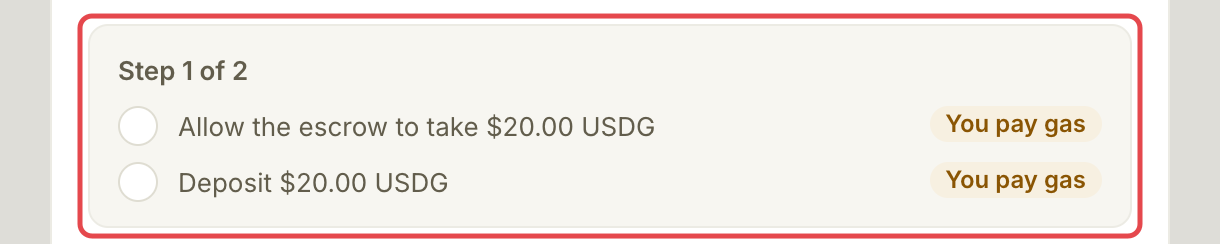
选择 **Deposit $20.00**，然后在第一个钱包提示中批准 **Allow the escrow to take $20.00 USDG**。这允许托管合约转入充值金额，此时尚未实际充值。这是一笔链上交易，因此也需要少量 ETH 手续费。

如果钱包已经授权了足够的 USDG，Assay 会跳过此请求。

<figure><img src="https://1515942101-files.gitbook.io/~/files/v0/b/gitbook-x-prod.appspot.com/o/spaces%2FZ3s1eCyfwYmPV4hcUtOZ%2Fuploads%2Fgit-blob-25227d8571062ecfe681b3ec8aaf4d070fe2ccfd%2Fadd-funds-3.png?alt=media" alt="完整的钱包提示进度，显示授权额度和充值步骤"><figcaption><p>核对两次钱包提示。</p></figcaption></figure>
{% endstep %}

{% step %}

### 确认充值

在下一个钱包提示中确认 **Deposit $20.00 USDG**。等待 **Deposit confirmed on chain**。

应用通常会在一分钟内记入充值。只有链上确认后，付费调用才能使用它，通常只需几秒。显示 **still confirming on chain** 时，资金尚不可用。
{% endstep %}
{% endstepper %}

## 确认是否成功

**Money → Funding** 的可用余额中会显示已确认的充值。仅提交交易或余额仍在确认中，都不算完成。

充值本身不会让智能体获得支付权限。接下来你会批准默认支付限额。如果充值确认后显示 **Next: set your account ceiling**，可以关闭侧栏：付费调用的批准流程也会在需要时包含该账户上限。

## 遇到问题时

| 你看到的情况                        | 处理方式                                                           |
| ----------------------------- | -------------------------------------------------------------- |
| 来源钱包中的 USDG 或 ETH 不足          | 确认来源钱包有用于充值的 USDG，以及 Robinhood Chain 上少量用于网络手续费的 ETH，然后再次检查余额。 |
| 金额低于最低要求                      | 至少使用 **$5**；默认金额是 **$20**。                                     |
| **still confirming on chain** | 等待确认后再尝试付费调用。不要仅因为第一笔仍在确认中就再次充值。                               |
| 钱包请求已取消                       | 重新打开 **Add funds**，检查余额，再重试未完成的操作。                             |

## 下一步

* [开启付费调用](/use-tools/zh/ru-men/turn-on-paid-calls.md)


---

# Agent Instructions
This documentation is published with GitBook. GitBook is the documentation platform designed so that both humans and AI agents can read, navigate, and reason over technical content effectively. Learn more at gitbook.com.

## Querying This Documentation
If you need additional information that is not directly available in this page, you can query the documentation by asking a question.

Perform an HTTP GET request on the following URL with the `ask` and `goal` query parameters:

```
GET https://docs.goassay.ai/use-tools/zh/ru-men/add-funds.md?ask=<question>&goal=<user_goal>
```

`ask` is the immediate question: it should be specific, self-contained, and written in natural language.
`goal` is what the user is ultimately trying to achieve, the reason they need the answer. Sharing it helps GitBook give you a better, more relevant answer. A goal is most helpful when it describes the outcome the user wants rather than restating the question. For example, with `ask=how do I create an API token`, a goal like `automate deployments from our CI pipeline` lets GitBook tailor the answer to that use case.

The response will contain a direct answer to the question and relevant excerpts and sources from the documentation.

Use this mechanism when the answer is not explicitly present in the current page, you need clarification or additional context, or you want to retrieve related documentation sections.