> For the complete documentation index, see [llms.txt](https://docs.goassay.ai/llms.txt). Markdown versions of documentation pages are available by appending `.md` to page URLs; this page is available as [Markdown](https://docs.goassay.ai/use-tools/zh/chu-xian-wen-ti-shi/get-a-refund.md).

# 退款或报告不良结果

查看自动退款，或报告已收费但结果有问题的调用。

Assay 检查发现调用失败或结果不可用时，不会收费，或会自动退款。已标为 **Not charged** 的调用无需提交问题报告。如果检查未发现某个已收费结果中的错误，请从收据报告该调用。

有效的空结果仍可能收费：“no matches” 与结果损坏不同。报告前请先阅读收据。

## 提交问题报告前

通常可在**调用完成后 7 天内**提交问题报告。这比退款窗口更长。收据会显示该调用的截止时间。

付费调用完成后，付款会暂扣 **1 小时**，之后提供方才会收到款项。收据显示仍可退款期间，及时提交且**被接受**的问题报告可获全额退款。收款前，收据也可能提供这项保证。请使用 **Activity → Calls** 中的 **Still refundable** 和收据上实时显示的 **Refundable until** 时间；不要按你要求 AI 调用的时间自行计算截止时间。

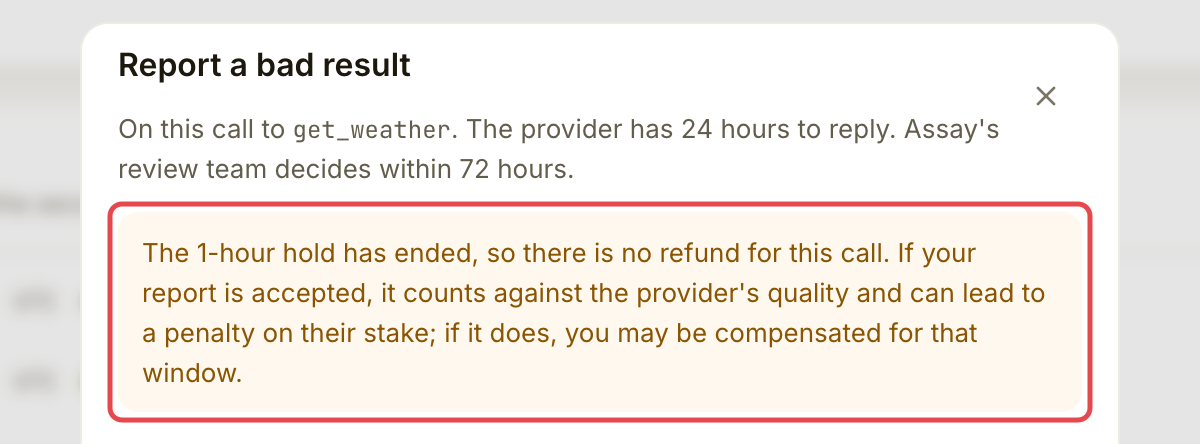
暂扣期结束后，报告不良结果仍会计入提供方的质量表现；如果之后发生罚没，也可能获得补偿，但该次调用不会退款。如果收据没有承诺全额退款，请不要自行假定有退款。

## 操作步骤

{% stepper %}
{% step %}

### 打开调用

前往 **Activity → Calls**，打开要报告的调用。阅读收据和 **Where the money went**。需要帮助查找调用时，请参阅[查看支出](/use-tools/zh/ri-chang-shi-yong/check-your-spending.md)。

检查失败、提供方出错、请求被拒、超时或缺少可用结果，都可能已经触发自动 **Not charged**。释放或退还的资金会回到 Assay 余额，不会直接转入钱包。**Activity → Not charged** 列出所有未向你收费的调用，并说明原因。

<figure><img src="https://1515942101-files.gitbook.io/~/files/v0/b/gitbook-x-prod.appspot.com/o/spaces%2FZ3s1eCyfwYmPV4hcUtOZ%2Fuploads%2Fgit-blob-257b4df40760370c2107034aa28551969304b918%2Fget-a-refund-1.png?alt=media" alt="已收费天气调用的 Where the money went 卡片"><figcaption><p>先阅读收据。</p></figcaption></figure>
{% endstep %}

{% step %}

### 打开 Report a bad result

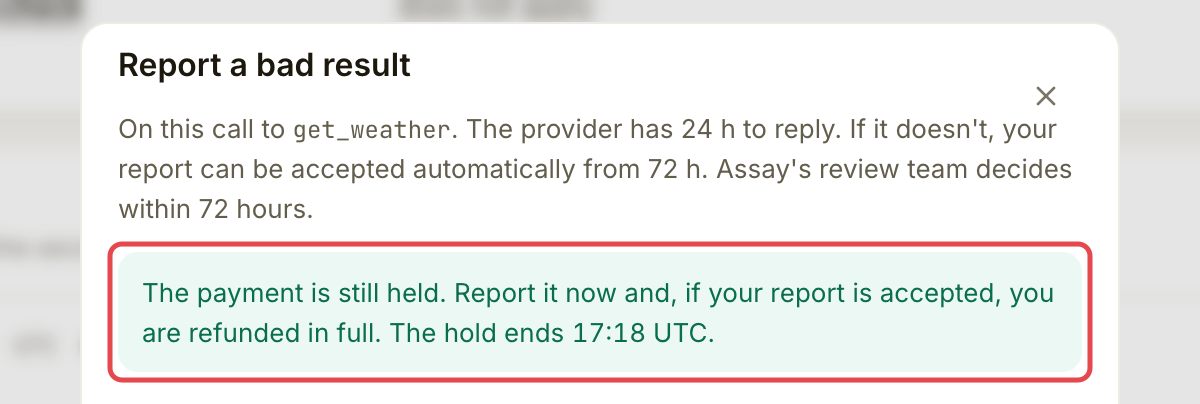
在收据上选择 **Report a bad result**。阅读侧栏说明，了解付款是否仍在暂扣，以及问题报告被接受后是否退款。

<figure><img src="https://1515942101-files.gitbook.io/~/files/v0/b/gitbook-x-prod.appspot.com/o/spaces%2FZ3s1eCyfwYmPV4hcUtOZ%2Fuploads%2Fgit-blob-daf73a31a226e36a8beae98d902faf19dcc1aa52%2Fget-a-refund-2.png?alt=media" alt="收据显示 Refundable until，并标出 Report a bad result"><figcaption><p>打开问题报告侧栏。</p></figcaption></figure>

<figure><img src="https://1515942101-files.gitbook.io/~/files/v0/b/gitbook-x-prod.appspot.com/o/spaces%2FZ3s1eCyfwYmPV4hcUtOZ%2Fuploads%2Fgit-blob-6e29b31ad18c84dcbb5cb38c5a11147fc1067cdd%2Fget-a-refund-3.png?alt=media" alt="问题报告侧栏，显示 Refundable until 以及问题报告被接受后全额退款的承诺"><figcaption><p>了解是否仍可退款。</p></figcaption></figure>
{% endstep %}

{% step %}

### 描述问题

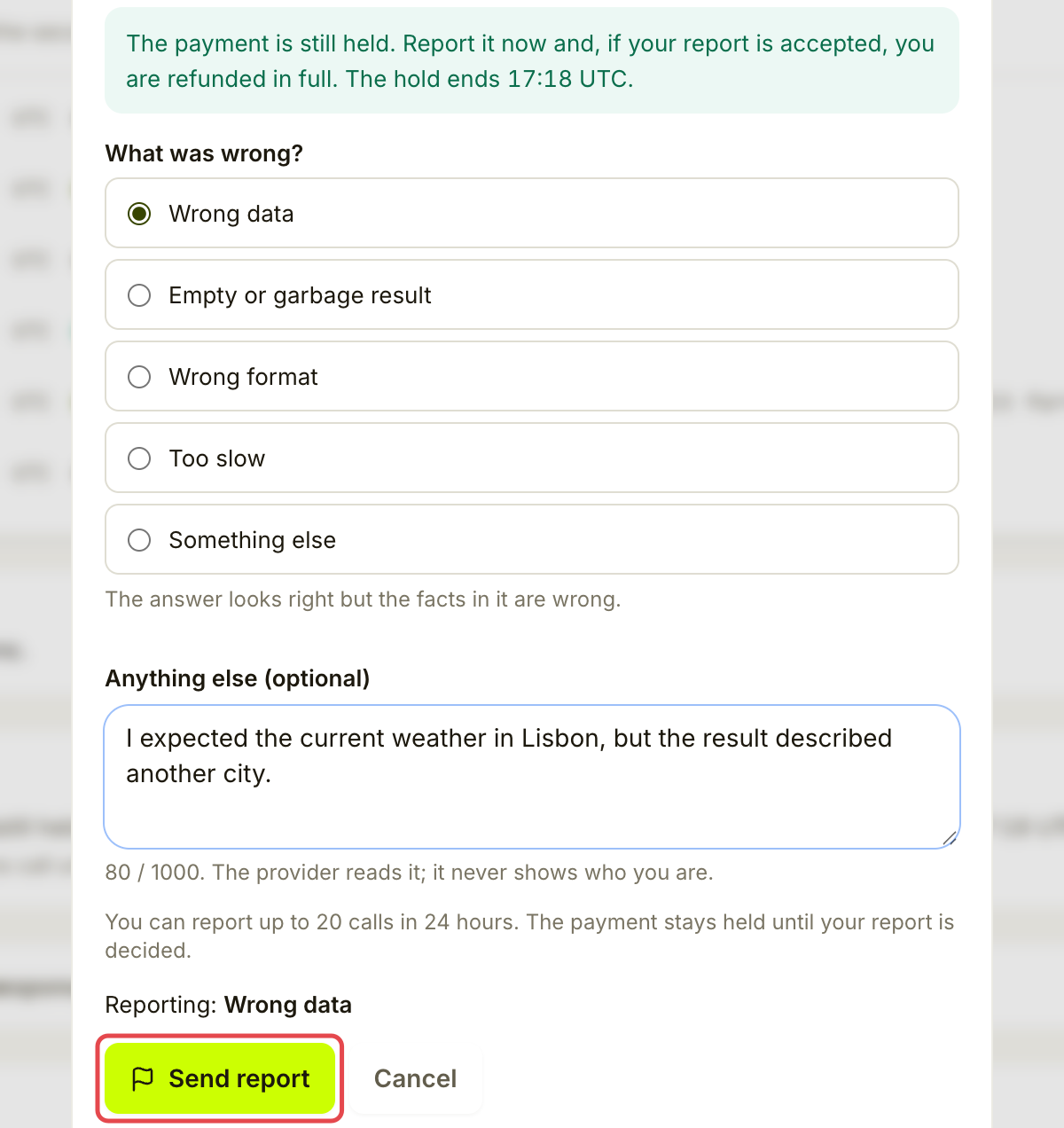
选择 **Wrong data**、**Empty or garbage result**、**Wrong format**、**Too slow** 或 **Something else**。填写预期结果和实际返回内容。说明最多 **1,000 个字符**；选择 **Something else** 时必须填写。

提供方能阅读说明，但 Assay 不会向其显示你的身份。请写明解释不良结果所需的信息。
{% endstep %}

{% step %}

### 发送问题报告

选择 **Send report**。暂时保持报告页面打开，确认提交成功，并阅读页面显示的截止时间。

<figure><img src="https://1515942101-files.gitbook.io/~/files/v0/b/gitbook-x-prod.appspot.com/o/spaces%2FZ3s1eCyfwYmPV4hcUtOZ%2Fuploads%2Fgit-blob-ff94ca6865c51ae53208c9b90532724a0a38bf14%2Fget-a-refund-4.png?alt=media" alt="暂扣付款的退款说明、已选中的 Wrong data 原因和已填写的说明，已标出 Send report，尚未提交"><figcaption><p>发送前检查问题报告。</p></figcaption></figure>
{% endstep %}

{% step %}

### 跟进结果

通过 **Activity → Reports** 或收据上的 **See the report** 返回。时间线会显示提供方回复、决定和退款状态。提供方有 **24 小时**回复。Assay 审核团队争取在提交后 **72 小时**内作出决定；页面会显示实际截止时间和延迟情况。

享有退款保证的问题报告，在决定作出前会继续暂扣付款。如果提供方始终未回复，满 72 小时后问题报告可能被自动接受；这并不保证到时立即作出决定。
{% endstep %}
{% endstepper %}

## 可能的结果

| 结果                    | 资金如何处理                               |
| --------------------- | ------------------------------------ |
| **Accepted**，且有退款保证   | 全额付款退回 Assay 余额。如果原本是未付欠款，该欠款可以被取消。  |
| **Refund on its way** | 正在记入退款。请再次检查；应用说明通常需要几分钟。            |
| **Not accepted**      | 不会通过该问题报告退款。此前因提供方被封禁而单独发生的退款可能继续保留。 |
| 暂扣期结束后被接受             | 会计入提供方的质量表现，但本次调用不退款。                |
| **Not charged**       | 没有已收取的费用可退。                          |
| 决定作出前已退款              | 被封禁提供方的暂扣付款可能提前退回。问题报告仍会继续处理并作出决定。   |

暂扣并非无限期：如果 Assay 始终未处理，付款会在暂扣期结束 7 天后释放给提供方。请跟进逾期的问题报告。

## 确认是否成功

收据显示 **You reported this call**，且 **See the report** 能打开时间线。退款完成后，应看到 **Refunded** 和恢复的金额。仅提交不代表问题报告已被接受。

## 遇到问题时

| 你看到的情况                                      | 处理方式                                               |
| ------------------------------------------- | -------------------------------------------------- |
| 没有 **Report a bad result** 按钮               | 检查调用是否已完成、已付款且仍在报告窗口内。免费调用和已不收费的调用不需要此退款流程。        |
| **The time to report this call has passed** | 报告窗口已关闭。如果仍需帮助，请保留收据并联系 Assay 支持。                  |
| **You already reported this call**          | 打开 **See the report**，不要再次提交。                      |
| 已达到问题报告上限                                   | 等待后重试。问题报告有每日上限，针对单个提供方的上限更低。反复提交被驳回的问题报告可能导致限额降低。 |
| **The payment is moving right now**         | 等待一分钟再重试。发送前重新检查退款承诺。                              |
| 决定逾期                                        | 打开问题报告查看时间线，并向 Assay 支持提供参考编号。                     |

<details>

<summary>如果暂扣已结束</summary>

<figure><img src="https://1515942101-files.gitbook.io/~/files/v0/b/gitbook-x-prod.appspot.com/o/spaces%2FZ3s1eCyfwYmPV4hcUtOZ%2Fuploads%2Fgit-blob-c9327f6e9605c0d304094626b3fb450e8d7a3cdd%2Fget-a-refund-5.png?alt=media" alt="已超过暂扣期的调用的问题报告侧栏，说明本次调用不予退款"><figcaption><p>暂扣结束后，先阅读提示，再决定是否报告。</p></figcaption></figure>

</details>

## 下一步

* [故障排除](/use-tools/zh/chu-xian-wen-ti-shi/troubleshooting.md)


---

# Agent Instructions
This documentation is published with GitBook. GitBook is the documentation platform designed so that both humans and AI agents can read, navigate, and reason over technical content effectively. Learn more at gitbook.com.

## Querying This Documentation
If you need additional information that is not directly available in this page, you can query the documentation by asking a question.

Perform an HTTP GET request on the following URL with the `ask` and `goal` query parameters:

```
GET https://docs.goassay.ai/use-tools/zh/chu-xian-wen-ti-shi/get-a-refund.md?ask=<question>&goal=<user_goal>
```

`ask` is the immediate question: it should be specific, self-contained, and written in natural language.
`goal` is what the user is ultimately trying to achieve, the reason they need the answer. Sharing it helps GitBook give you a better, more relevant answer. A goal is most helpful when it describes the outcome the user wants rather than restating the question. For example, with `ask=how do I create an API token`, a goal like `automate deployments from our CI pipeline` lets GitBook tailor the answer to that use case.

The response will contain a direct answer to the question and relevant excerpts and sources from the documentation.

Use this mechanism when the answer is not explicitly present in the current page, you need clarification or additional context, or you want to retrieve related documentation sections.