> For the complete documentation index, see [llms.txt](https://docs.goassay.ai/llms.txt). Markdown versions of documentation pages are available by appending `.md` to page URLs; this page is available as [Markdown](https://docs.goassay.ai/use-tools/manage-your-account/close-your-account.md).

# Close your account

Prepare your funds, records and app connections before asking Assay to close your account.

Assay's **Close account** page is a preparation checklist. Closing is done by the Assay team; no button in the app closes the account. Completing the checklist does not delete your account or its records.

{% hint style="info" %}
**Before you start:** you need access to your account's wallet to withdraw funds and stop payment keys. Save any records you want to keep before asking for closure.
{% endhint %}

## Steps

{% stepper %}
{% step %}

### Open the checklist

Open the account menu, choose **Settings**, then **Close account**. Read **Before you close**.

<figure><img src="https://141356682-files.gitbook.io/~/files/v0/b/gitbook-x-prod.appspot.com/o/spaces%2FAhFBOJnejgrUxXsfscIS%2Fuploads%2Fgit-blob-5c78cf926d84dd43c9936383769e329bf15a0490%2Fclose-your-account-1.png?alt=media" alt="Before you close checklist header and completion count"><figcaption><p>Check your progress before closing the account.</p></figcaption></figure>
{% endstep %}

{% step %}

### Finish the money and report checks

Use [Fix a paused or refused payment](/use-tools/when-something-goes-wrong/fix-a-payment-problem.md) to settle any owed calls, and [Withdraw funds](/use-tools/manage-your-account/withdraw-funds.md) to move the remaining available balance to your wallet. Finish the claim; requesting a withdrawal alone does not remove the funds.

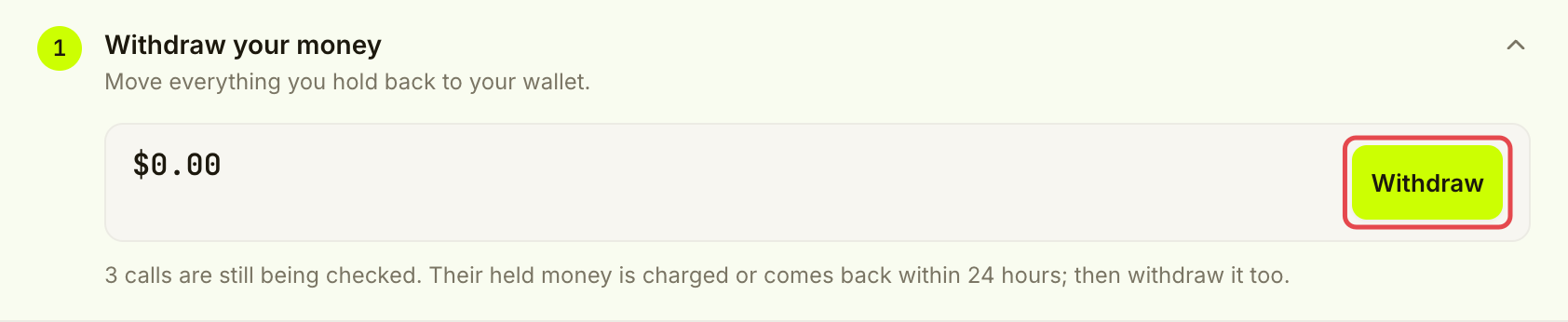
Calls still being checked and payments still owed can keep money held. Wait for those checks or collections to finish, then withdraw what remains. If you have open reports, follow them through **Activity → Reports** using [Get a refund or report a bad result](/use-tools/when-something-goes-wrong/get-a-refund.md). Check for any refund that returns to your balance before treating the withdrawal as complete.

**Withdraw your money** ticks itself only when Assay can read the balances, no withdrawable money or open holds remain, and no payment is owed. The checklist does not separately check for open reports; review them yourself before requesting closure.

<figure><img src="https://141356682-files.gitbook.io/~/files/v0/b/gitbook-x-prod.appspot.com/o/spaces%2FAhFBOJnejgrUxXsfscIS%2Fuploads%2Fgit-blob-793df564bcddfff1a3a056cbe498fb916ee616ca%2Fclose-your-account-2.png?alt=media" alt="Withdrawal checklist item showing calls still being checked and the Withdraw link"><figcaption><p>Held calls can leave more money to withdraw later.</p></figcaption></figure>
{% endstep %}

{% step %}

### Keep your records

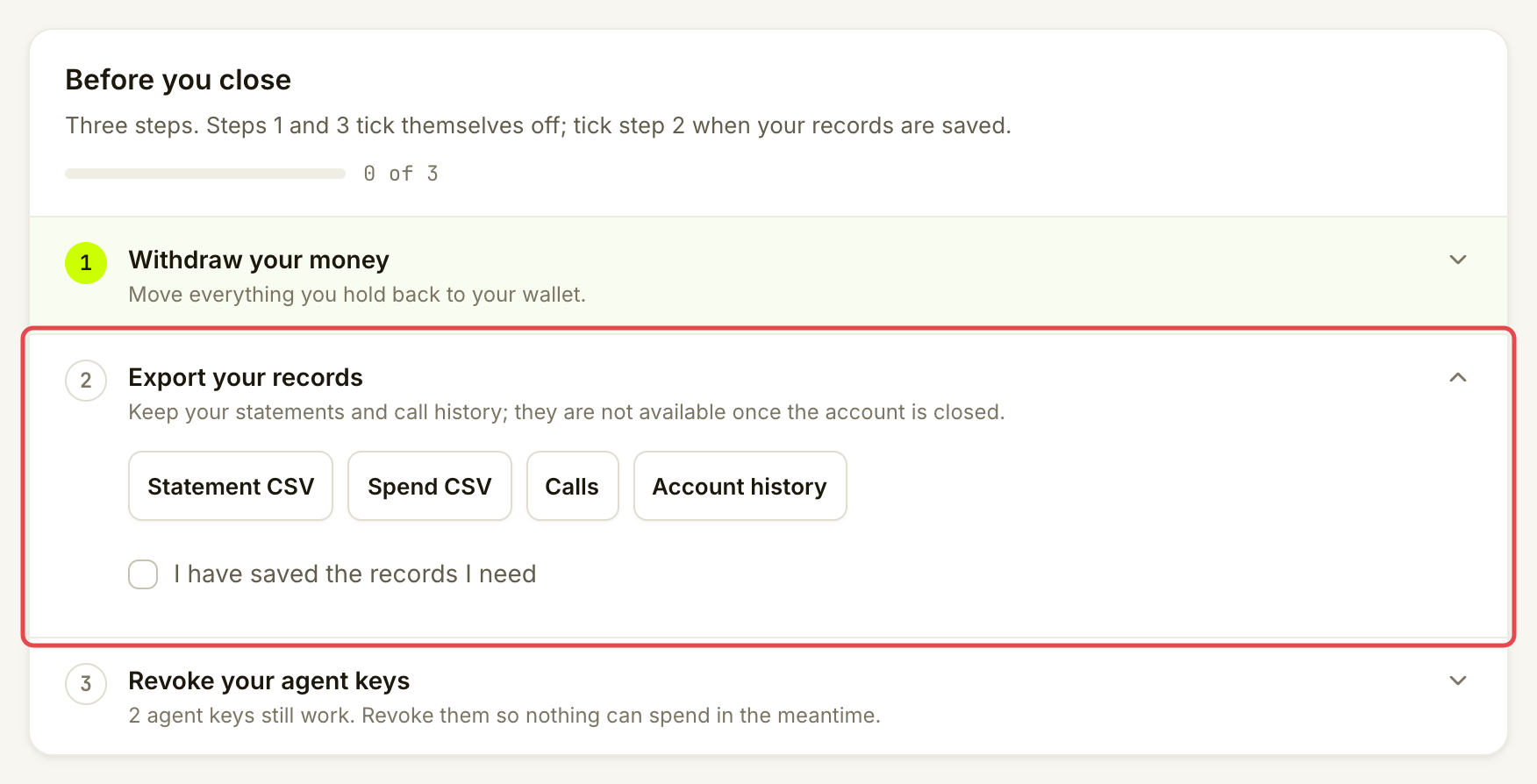
Use **Statement CSV** and **Spend CSV** to save the exports described in [Statements and exports](/use-tools/everyday-use/statements-and-exports.md). Review **Calls** and **Account history**, and keep any receipts or change references you need. These links open those views; they do not export every record automatically.

Mark the records-saved checkbox only after saving what you need. The page warns that statements and call history will not be available once the account is closed.

<figure><img src="https://141356682-files.gitbook.io/~/files/v0/b/gitbook-x-prod.appspot.com/o/spaces%2FAhFBOJnejgrUxXsfscIS%2Fuploads%2Fgit-blob-78c8c28cd247ec98d93d472a29aa8185e1ff4725%2Fclose-your-account-3.png?alt=media" alt="Export your records checklist item with statement export and records acknowledgement marked"><figcaption><p>Keep records before asking for closure.</p></figcaption></figure>
{% endstep %}

{% step %}

### Stop app access and payment permission

Choose **Revoke agent keys** to open **Controls → Agents**. Follow [Manage agents, connected apps and payment keys](/use-tools/advanced/manage-agents-apps-and-keys.md) to revoke the apps and API keys you no longer want working, and stop their payment keys on chain.

**Revoke your agent keys** ticks itself when no app or API key is live. This check alone does not prove every payment key's on-chain permission is off. Review any **Payment key still active on chain** or **may still be active on chain** rows before finishing.

<figure><img src="https://141356682-files.gitbook.io/~/files/v0/b/gitbook-x-prod.appspot.com/o/spaces%2FAhFBOJnejgrUxXsfscIS%2Fuploads%2Fgit-blob-8adf8fa1e2b7974cf0689c01882126397529d8df%2Fclose-your-account-4.png?alt=media" alt="Expanded Revoke your agent keys item with two live keys and Revoke agent keys marked"><figcaption><p>Open Agents to review the keys that still work. Check payment permission separately.</p></figcaption></figure>
{% endstep %}

{% step %}

### Read the closure option

Return to **Close account**. If **Ask us to close the account** is available, it opens the support destination after the checklist is complete. Send the request there and wait for the team's response; opening the link does not close the account.

If the page says the team closes accounts but shows no request link, contact Assay support to ask for closure. You can leave the account with no funds and no working keys. The page says it costs nothing and you can sign in again. It remains an account until the team closes it.

<figure><img src="https://141356682-files.gitbook.io/~/files/v0/b/gitbook-x-prod.appspot.com/o/spaces%2FAhFBOJnejgrUxXsfscIS%2Fuploads%2Fgit-blob-35a019dd799686a73dbaf3066628fd4fe4c70452%2Fclose-your-account-5.png?alt=media" alt="Close the account panel explaining that closure is handled by the Assay team"><figcaption><p>Read which closure option the page offers.</p></figcaption></figure>
{% endstep %}
{% endstepper %}

## Check it worked

The money and key checks are complete, and you have kept your records. If you requested closure, keep the team's reply as confirmation. **Ready to close** means preparation is complete; it is not confirmation that the account was closed.

There is no self-service data-erasure flow or closure-specific retention schedule shown here. The app warns about losing access to statements and call history after closure, but does not promise to erase all stored data. Ask the team what they retain and what they can delete before requesting closure if this matters to you.

## If something goes wrong

| You see                                     | Do this                                                                                |
| ------------------------------------------- | -------------------------------------------------------------------------------------- |
| A balance or held payment could not be read | Retry later. Missing data does not count as a completed withdrawal.                    |
| A payment is still owed                     | Settle it, wait for collection and withdraw the remainder.                             |
| A report is still open                      | Follow its timeline and resolve any resulting refund before finishing the money check. |
| A key still works                           | Revoke the intended app or API key, and check its separate payment permission.         |
| No request link                             | Contact Assay support to ask for closure. Preparing the account does not close it.     |

## Go further

* [Withdraw funds](/use-tools/manage-your-account/withdraw-funds.md)
* [Statements and exports](/use-tools/everyday-use/statements-and-exports.md)
* [Manage agents, connected apps and payment keys](/use-tools/advanced/manage-agents-apps-and-keys.md)

## Next

* [Troubleshooting](/use-tools/when-something-goes-wrong/troubleshooting.md)


---

# Agent Instructions
This documentation is published with GitBook. GitBook is the documentation platform designed so that both humans and AI agents can read, navigate, and reason over technical content effectively. Learn more at gitbook.com.

## Querying This Documentation
If you need additional information that is not directly available in this page, you can query the documentation by asking a question.

Perform an HTTP GET request on the following URL with the `ask` and `goal` query parameters:

```
GET https://docs.goassay.ai/use-tools/manage-your-account/close-your-account.md?ask=<question>&goal=<user_goal>
```

`ask` is the immediate question: it should be specific, self-contained, and written in natural language.
`goal` is what the user is ultimately trying to achieve, the reason they need the answer. Sharing it helps GitBook give you a better, more relevant answer. A goal is most helpful when it describes the outcome the user wants rather than restating the question. For example, with `ask=how do I create an API token`, a goal like `automate deployments from our CI pipeline` lets GitBook tailor the answer to that use case.

The response will contain a direct answer to the question and relevant excerpts and sources from the documentation.

Use this mechanism when the answer is not explicitly present in the current page, you need clarification or additional context, or you want to retrieve related documentation sections.