> For the complete documentation index, see [llms.txt](https://docs.goassay.ai/llms.txt). Markdown versions of documentation pages are available by appending `.md` to page URLs; this page is available as [Markdown](https://docs.goassay.ai/list-your-api/zh/jin-jie/manage-your-stake.md).

# 管理质押

检查付费工具所需质押，添加 USDG，并规划提取。

质押是你在 Robinhood Chain 上锁定的 USDG，用来担保失败率承诺。它与收益分开：[获取收益](/list-your-api/zh/ru-men/get-paid.md)说明调用付款如何转入结算付款钱包。

{% hint style="info" %}
\*\*开始前：\*\*完成[账户和钱包设置](/list-your-api/zh/ru-men/set-up-your-account.md)。进行钱包操作时，请备好持有质押的钱包、要添加的 USDG，以及用于网络手续费的 ETH。质押钱包与结算付款钱包需分别验证。
{% endhint %}

## 操作步骤

选择需要的任务。查看质押无需发起钱包操作。

{% tabs %}
{% tab title="Check what you need" %}
{% stepper %}
{% step %}

### 阅读 Stake

打开 **Stake**。比较 **Staked**、**Needed** 和 **Recommended**。**Needed** 是各付费工具要求中的最大值，不是总和。**Recommended** 是该金额的 1.5 倍，在罚没减少质押时提供缓冲。

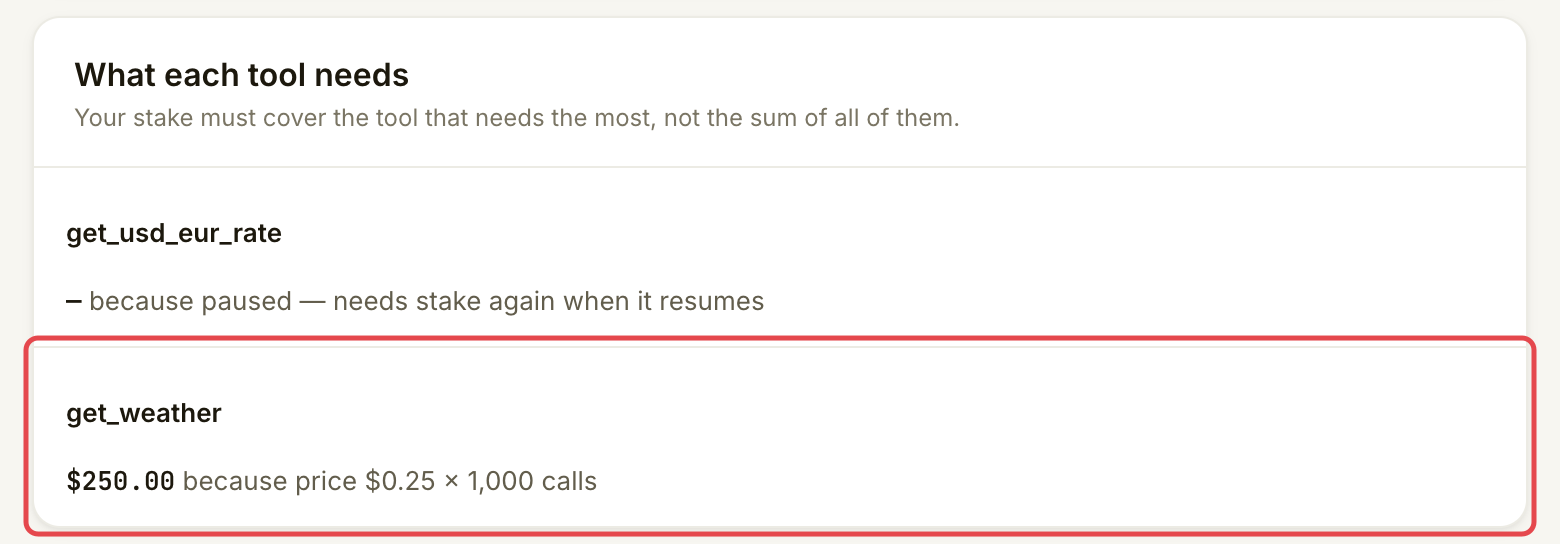
在 **What each tool needs** 阅读各工具旁的原因。标准要求为 $50 或按其价格计算的 1,000 次调用金额，取较高者。例如，每次 $0.25 的付费调用通常需要 $250。免费工具无需质押。链上最低要求或与 Assay 约定的金额可能改变要求，因此请使用账户显示的金额。

<figure><img src="https://2968587239-files.gitbook.io/~/files/v0/b/gitbook-x-prod.appspot.com/o/spaces%2FEVw4IWiK1TgVNFeMYjWm%2Fuploads%2Fgit-blob-32fb107257c5cc7fcd2c7c413cea1b29e289be48%2Fmanage-your-stake-1.png?alt=media" alt="What each tool needs 卡片，显示 get_weather 价格为每次 $0.25，所需质押为 $250"><figcaption><p>添加或提取资金前，阅读每个工具的要求。</p></figcaption></figure>
{% endstep %}
{% endstepper %}
{% endtab %}

{% tab title="Add stake" %}
{% stepper %}
{% step %}

### 打开 Add stake

在 **Stake** 选择 **Add stake**；质押不足时，按钮会显示需添加的金额。在 **From your wallet** 中，按需选择 **Connect a wallet**。连接 Robinhood Chain 上预期的质押钱包。

<figure><img src="https://2968587239-files.gitbook.io/~/files/v0/b/gitbook-x-prod.appspot.com/o/spaces%2FEVw4IWiK1TgVNFeMYjWm%2Fuploads%2Fgit-blob-42643db4694e68eabc83b2c0c6805f823e90081f%2Fmanage-your-stake-2.png?alt=media" alt="Add stake 中的 From your wallet 卡片，已标出 Connect a wallet"><figcaption><p>连接将持有质押的钱包。</p></figcaption></figure>
{% endstep %}

{% step %}

### 核对金额和钱包步骤

选择 **Needed now**、建议金额或 **Custom**。可读取钱包余额时，检查 **Amount to stake**、操作后的 **Your stake** 金额和 **Before you sign**。

<figure><img src="https://2968587239-files.gitbook.io/~/files/v0/b/gitbook-x-prod.appspot.com/o/spaces%2FEVw4IWiK1TgVNFeMYjWm%2Fuploads%2Fgit-blob-0303546a585adaed9411db0d465c9438e6a97305%2Fmanage-your-stake-3.png?alt=media" alt="Amount to stake 选择器，已选择 Custom 并输入 375"><figcaption><p>打开任何钱包提示前，先选择并核对金额。</p></figcaption></figure>

选择显示金额的 **Stake** 前，阅读签名列表。如果钱包尚未验证，第一条消息会免费确认所有权。然后按提示批准 USDG 支出并确认存入。授权允许质押合约转移该金额；存入操作才会将其转为质押。每笔交易都需要 ETH 网络手续费。请在每个钱包提示中核对金额。

<figure><img src="https://2968587239-files.gitbook.io/~/files/v0/b/gitbook-x-prod.appspot.com/o/spaces%2FEVw4IWiK1TgVNFeMYjWm%2Fuploads%2Fgit-blob-94b4a6d8211e8dd86f674b609da5f7e2d622fb6f%2Fmanage-your-stake-4.png?alt=media" alt="Add stake 签名列表，分别显示钱包所有权验证、授权和存入步骤"><figcaption><p>所有权验证、授权和存入各有不同用途。</p></figcaption></figure>
{% endstep %}
{% endstepper %}
{% endtab %}

{% tab title="Withdraw stake" %}
{% stepper %}
{% step %}

### 阅读提取规则

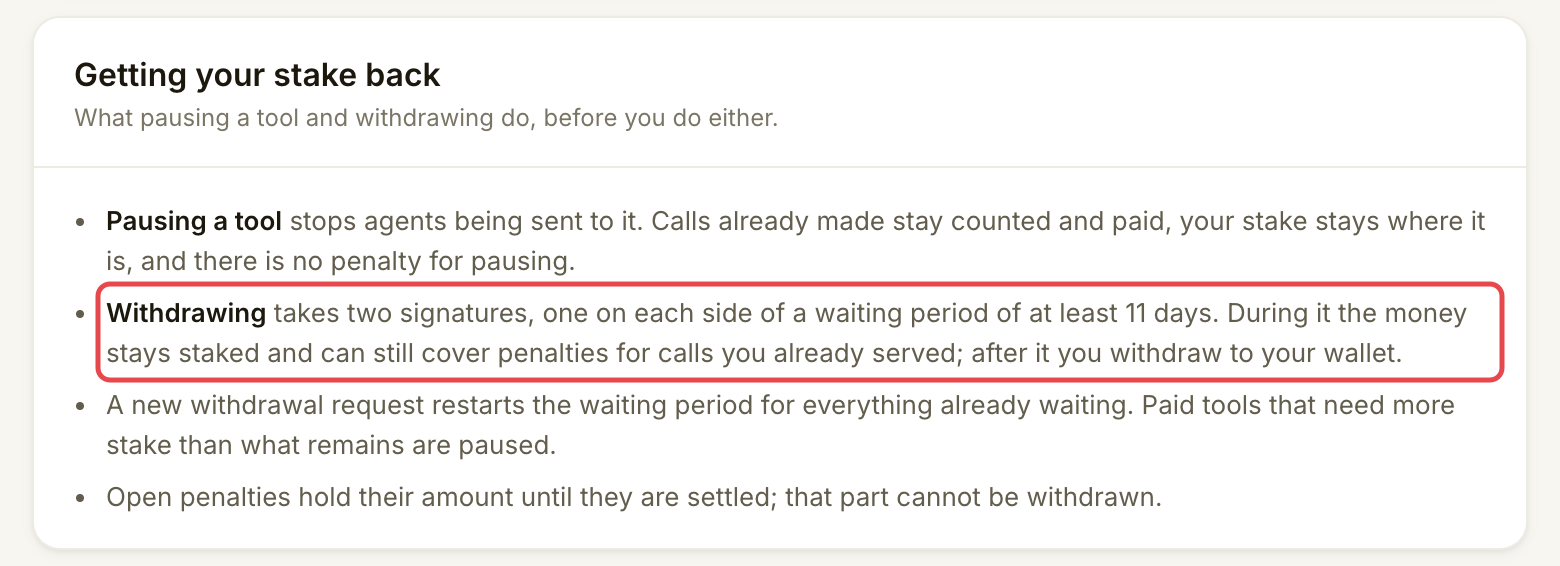
在 **Stake** 阅读 **Getting your stake back**，再选择 **Withdraw**。提取包含两笔钱包交易，中间有解绑等待期：资金等待退出质押，但仍可用于覆盖你已提供调用的罚没。

如果在提取过程中执行罚没，会先从已在解绑的金额中扣除。

页面会显示等待期。如果显示 **at least 11 days**，这是最短时间，不是已确认的解锁日期。提取流程开始后，请以显示的日期为准。

<figure><img src="https://2968587239-files.gitbook.io/~/files/v0/b/gitbook-x-prod.appspot.com/o/spaces%2FEVw4IWiK1TgVNFeMYjWm%2Fuploads%2Fgit-blob-c265b1672a2e8d6e0c7987d41a8ce532b452ab73%2Fmanage-your-stake-5.png?alt=media" alt="Getting your stake back 卡片，说明等待期、计时重置和罚没暂扣"><figcaption><p>规划等待时间及其对付费工具的影响。</p></figcaption></figure>
{% endstep %}

{% step %}

### 开始提取

选择 **Withdraw**，按提示连接质押钱包。在 **Withdraw stake** 核对 **Amount to withdraw**。建议金额会为付费工具和未解决的罚没保留足够资金。**Max without pausing** 使用此金额。**Everything** 可能暂停工具；继续前阅读列出的工具和确认项。

检查时间线和解锁日期，再选择显示金额的 **Start withdrawing**，在钱包中确认交易。此时资金尚未转回。新请求会为所有已在解绑的金额重新计时。未解决的罚没会保留相应金额，直到处理完毕；这部分不可提取。
{% endstep %}

{% step %}

### 等待后返回

当 **Stake** 显示 **Withdrawable**，选择显示可用金额的 **Withdraw**。阅读 **Withdraw your stake**，再确认提取到质押钱包。第二笔交易也需要 ETH 网络手续费。仅等待不会转移资金。
{% endstep %}
{% endstepper %}
{% endtab %}
{% endtabs %}

## 确认是否成功

添加后，等待 **staked** 和更新后的 **Staked** 数字。控制台说明，Assay 读取链上状态后通常会在约一分钟内更新。仅授权不算存入。

开始提取后，**Stake** 显示 **Unbonding** 及其日期。最终提取后，检查 **Withdrawn to your wallet** 和钱包的 USDG 余额。所需质押高于剩余质押的付费工具有 7 天宽限期。其所在行显示 **Pauses … unless stake is added** 及日期。请在此之前添加质押，否则它将停止接收付费调用。

## 遇到问题时

| 你看到的情况                                      | 处理方式                                                                                                |
| ------------------------------------------- | --------------------------------------------------------------------------------------------------- |
| **Nothing staked yet**                      | 开始提取前先添加质押。                                                                                         |
| 质押不足，或显示 **Pauses … unless stake is added** | 阅读 **What each tool needs**，在该日期前为想继续提供的工具添加足够质押。                                                   |
| 无法读取链上余额                                    | 重试。无法读取的金额不表示余额为零。                                                                                  |
| 钱包操作被拒绝                                     | 核对保存的金额，准备好后重试。已完成步骤不会重复。                                                                           |
| 交易已发送，但未确认                                  | 查看区块浏览器链接。**Try again** 会先检查已提交交易，再发送另一笔。                                                           |
| 提取会暂停工具                                     | 减少金额，或按[编辑、暂停或恢复上架](/list-your-api/zh/ri-chang-shi-yong/edit-pause-or-resume-a-listing.md)准备停止这些工具。 |

## 进一步了解

* 开发者（可选）：[链上质押与罚没](https://docs.goassay.ai/developers/zh/list-your-api/staking-and-penalties)。

## 下一步

* [质量与 SLA](/list-your-api/zh/jin-jie/quality-and-sla.md)


---

# Agent Instructions
This documentation is published with GitBook. GitBook is the documentation platform designed so that both humans and AI agents can read, navigate, and reason over technical content effectively. Learn more at gitbook.com.

## Querying This Documentation
If you need additional information that is not directly available in this page, you can query the documentation by asking a question.

Perform an HTTP GET request on the following URL with the `ask` and `goal` query parameters:

```
GET https://docs.goassay.ai/list-your-api/zh/jin-jie/manage-your-stake.md?ask=<question>&goal=<user_goal>
```

`ask` is the immediate question: it should be specific, self-contained, and written in natural language.
`goal` is what the user is ultimately trying to achieve, the reason they need the answer. Sharing it helps GitBook give you a better, more relevant answer. A goal is most helpful when it describes the outcome the user wants rather than restating the question. For example, with `ask=how do I create an API token`, a goal like `automate deployments from our CI pipeline` lets GitBook tailor the answer to that use case.

The response will contain a direct answer to the question and relevant excerpts and sources from the documentation.

Use this mechanism when the answer is not explicitly present in the current page, you need clarification or additional context, or you want to retrieve related documentation sections.