> For the complete documentation index, see [llms.txt](https://docs.goassay.ai/llms.txt). Markdown versions of documentation pages are available by appending `.md` to page URLs; this page is available as [Markdown](https://docs.goassay.ai/list-your-api/advanced/your-public-handle.md).
# Your public handle
Check the public name behind your tools and know when a rename needs support.
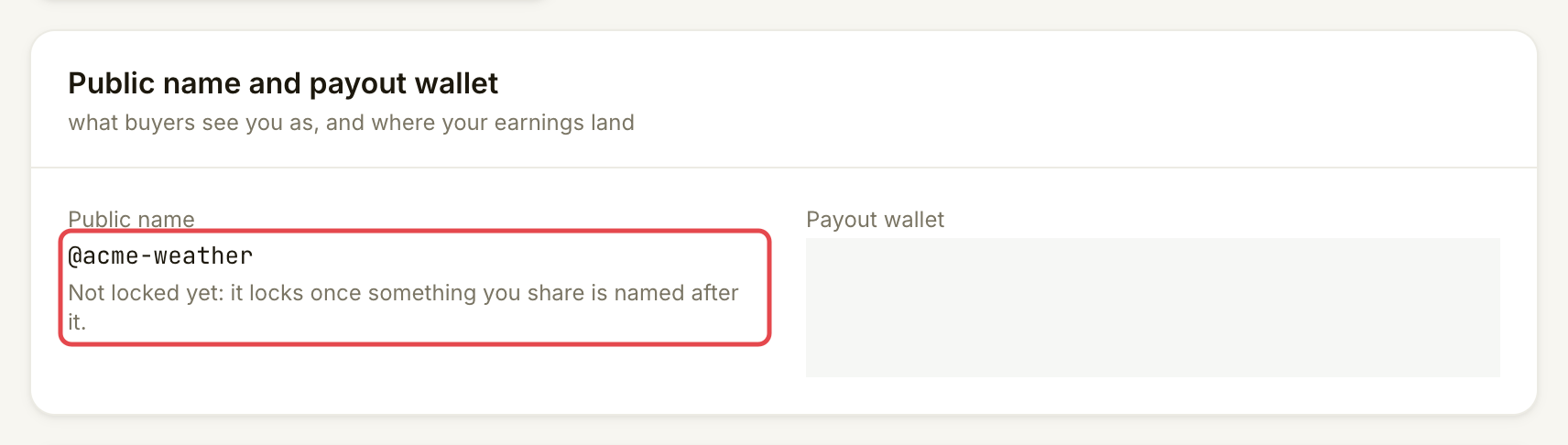
Your handle is the **Public name** shown as `@acme-weather`. It identifies your organization in shared tool names and tool set links. It does not expose your email, wallet address or contact name.
{% hint style="info" %}
**Before you start:** [Set up your account and wallet](/list-your-api/get-started/set-up-your-account.md). Serving an existing catalogue tool does not require a public name.
{% endhint %}
## Steps
{% stepper %}
{% step %}
### Check your name and whether it is locked
Open **Account** and find **Public name and payout wallet**. Read **Public name** and the line below it. **Not locked yet** means nothing shared has locked the name. **Locked** means shared tools or tool sets already use it.
Check the name and lock status before planning a change.
{% endstep %}
{% step %}
### Claim a name if you do not have one
If the card says **Not claimed yet**, follow [Claim your public name](/list-your-api/get-started/publish-your-own-api.md#claim-your-public-name) in the existing publishing guide. That walkthrough shows the form and **Claim** action; you do not need to create another tool to check a name you already hold.
Choose a business name you can keep. Names use 3–24 lowercase letters, digits or `-`, starting with a letter. A name may be taken or reserved. To claim a name, your organization must meet Assay's eligibility checks, such as having added funds once or being a verified provider. Claims are rate-limited per person.
{% endstep %}
{% step %}
### Ask support before renaming a shared name
The name locks when you first share a tool with **Anyone with the link**, submit it for catalogue review, or share a tool set. Saving a private tool or a version for **Only my team** does not lock it.
Once locked, contact Assay support to rename it. Include your current public name, the name you want and why you need the change. **Account** has no public-name rename button. Do not create another organization just to work around the lock.
{% endstep %}
{% endstepper %}
## Check it worked
After claiming, **Account → Public name** shows the chosen name. Your own tool's **Name** screen previews how agents call it: for example, `acme-weather__get_weather_summary`. This combines your organization name and the tool's name.
After a support-assisted rename, check the account card again and follow support's instructions for existing shared links and tool names. A request to support alone does not change them.
## If something goes wrong
| You see | Do this |
| --------------------------------------- | ------------------------------------------------------------------------------------------------------------------------ |
| **Not claimed yet** | Use the claim step in [Publish your own API](/list-your-api/get-started/publish-your-own-api.md#claim-your-public-name). |
| The name is taken or reserved | Choose another business name or one of the available suggestions. |
| The claim is refused | Contact Assay support to verify you. Claims are rate-limited per person. |
| **Locked** | Contact Assay support for a rename. The console cannot change a locked name. |
| **Not locked yet**, but no edit control | Contact Assay support for help. The current provider Account page shows status but has no rename editor. |
Optional: check the name agents see
For an existing own API, open **Listings → Your APIs**, select it and open **Name**. **Agents call it** shows the full name. Agent apps can also add their own server prefix. A tool's local name cannot change; a different local name requires a new tool.
## Go further
* [Publish your own API](/list-your-api/get-started/publish-your-own-api.md) for the public-name form and tool-name preview.
## Next
* [Request a new tool](/list-your-api/advanced/request-a-new-tool.md)
---
# Agent Instructions
This documentation is published with GitBook. GitBook is the documentation platform designed so that both humans and AI agents can read, navigate, and reason over technical content effectively. Learn more at gitbook.com.
## Querying This Documentation
If you need additional information that is not directly available in this page, you can query the documentation by asking a question.
Perform an HTTP GET request on the following URL with the `ask` and `goal` query parameters:
```
GET https://docs.goassay.ai/list-your-api/advanced/your-public-handle.md?ask=&goal=
```
`ask` is the immediate question: it should be specific, self-contained, and written in natural language.
`goal` is what the user is ultimately trying to achieve, the reason they need the answer. Sharing it helps GitBook give you a better, more relevant answer. A goal is most helpful when it describes the outcome the user wants rather than restating the question. For example, with `ask=how do I create an API token`, a goal like `automate deployments from our CI pipeline` lets GitBook tailor the answer to that use case.
The response will contain a direct answer to the question and relevant excerpts and sources from the documentation.
Use this mechanism when the answer is not explicitly present in the current page, you need clarification or additional context, or you want to retrieve related documentation sections.